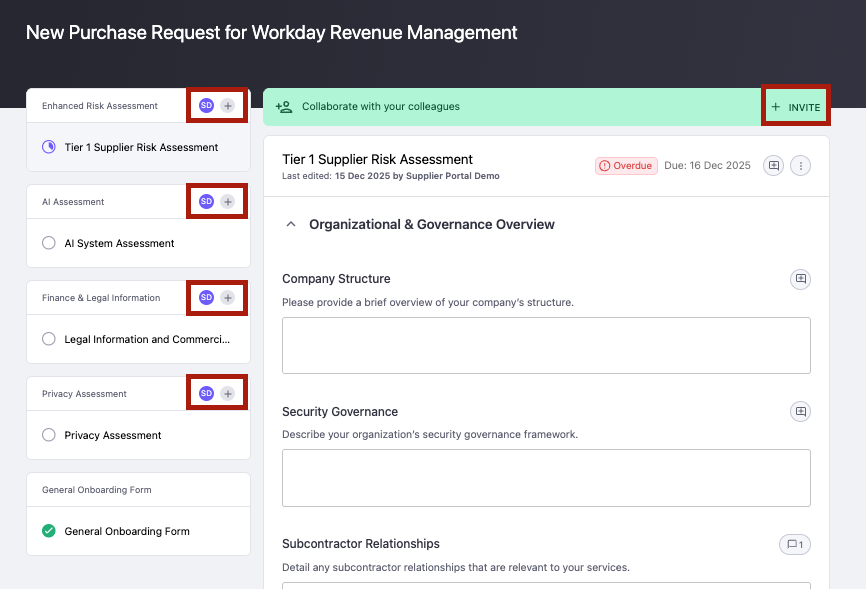
Collaborating with Colleagues on a Task as a Supplier
Last updated: January 19, 2026
This article explains how suppliers can invite colleagues to collaborate on a task in Omnea. You’ll learn where collaboration controls appear and how to give others access to help complete forms accurately and on time.
Who is this for?
This article is for suppliers who want to involve colleagues in completing a task or assessment in Omnea.
No admin access or special permissions are required.
Guide
Open a task from the supplier dashboard.
Choose one of the following ways to invite collaborators:
Select Invite in the Collaborate with your colleagues banner at the top of the page.
Select the plus (+) icon shown next to an assessment or section in the left-hand panel.
Enter your colleague’s name and email address.
Send the invitation.
Your colleague will receive an email with secure access to the same task.
How it works
Collaborators are added as external users for that task. They can open the same assessments and forms, contribute responses, and see updates in real time. All changes are saved automatically and shared across collaborators.
Considerations
Collaborators only have access to the specific task they’re invited to.
All collaborators see the same questions, responses, and comments.
Invitations are sent by email and use secure, link-based access.
You can add multiple collaborators to the same task.