Intelligent Request Status
Last updated: August 20, 2026
An agent that sweeps your environment every hour — even when you’re asleep — and tells you which requests need your attention before they become escalations.
The problem
Procurement teams spend their days reacting. A stakeholder messages asking where their PO is. A supplier emails about a stalled onboarding. A leader asks “what’s the status of the renewal we discussed?”. By the time you find out something needs you, it’s already an escalation — and you’re firefighting from the back foot.
The information you need to stay ahead is technically all in Omnea. It’s just sometimes buried — one request at a time, behind a click, in a sub-tab, in a comment thread from last week. It’s difficult to make time to manually sweep every active request every day to spot the ones drifting off course.
Omnea’s Intelligent Request Status
The AI Request Status turns Omnea from a system of record into a system of attention — directing you to the requests that need you, before they ask you.
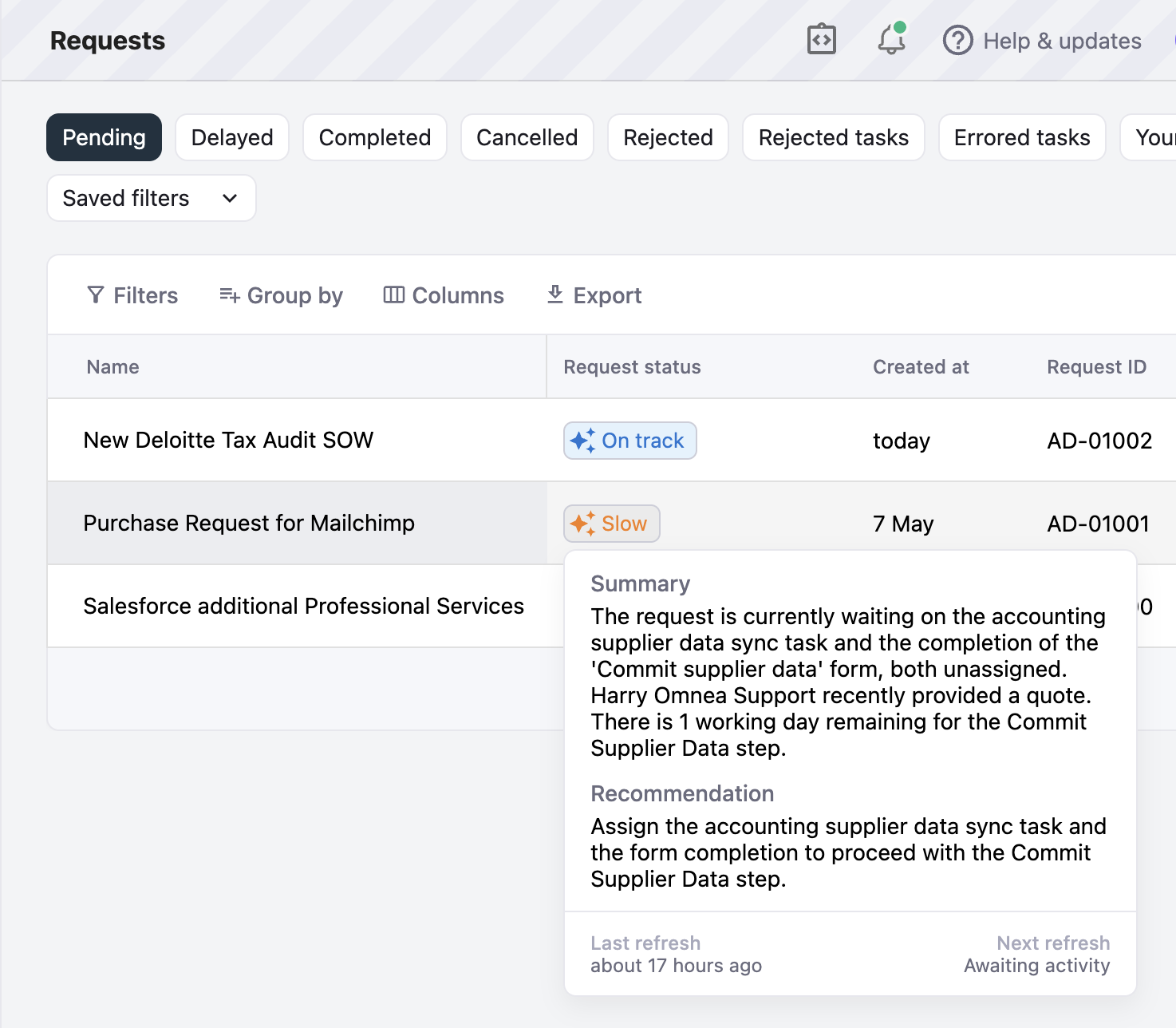
The Agent is an always-on AI that does that sweep for you. It continuously reads the state of every active request in your environment — overdue steps, unassigned approvers, errored integrations, rejected tasks, recent comment activity — and rolls each one up into a single colored pill in your Requests table that tells you, at a glance, what needs you.
Pill | What it commonly means | What to do |
|---|---|---|
On track | Within SLA, assigned, no errors or escalations | Nothing — keep doing what you’re doing |
Slow | Past SLA, but recent activity shows it’s already moving again | Keep an eye on it; likely already moving again |
Needs attention | Past SLA with no sign it’s moving on its own, an unassigned active step, or a worrying comment thread | Click in and unblock it |
Blocked | Errored task, rejected task, or paused | Can’t progress until you intervene |
Completed / Rejected | Terminal — the request is done | No further action |
Sort by the column to see the most urgent rows first. Filter by pill state to slice your queue (“show me only the Needs attention requests”).
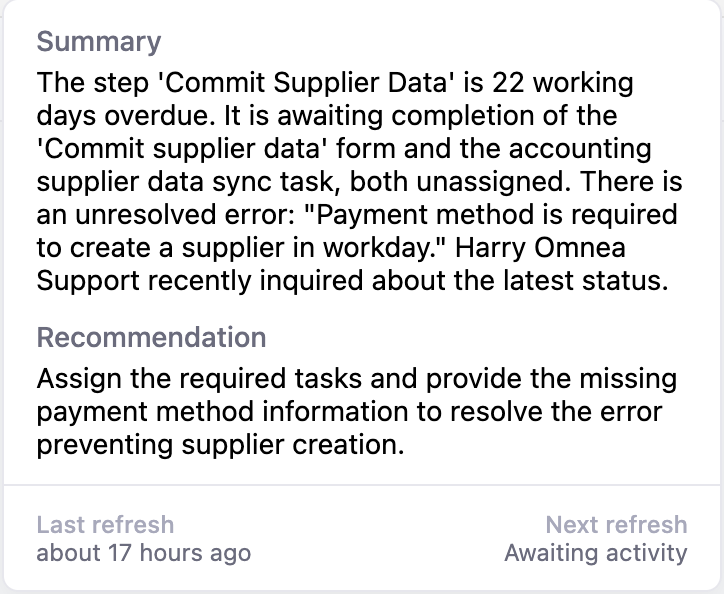
It will also tell you whats happening and a recommendation of what to do.
Hover any AI-set pill (the ones with the ✨ sparkle) for a short summary of what’s happening and a recommended next action.
How it works
What the Agent watches
When something meaningful happens on a request, the Agent queues a refresh:
A new comment is posted
A form submission is created
A task is completed, rejected, or its deadline lapses
A request step completes
A request is paused or resumed
A burst of activity is collated into a single refresh — usually within the hour, though blocking events like a rejection refresh sooner.
What the Agent reads
For each refresh, the Agent loads:
Every active step on the request, including its SLA, how overdue it is, and who’s assigned to it
All open tasks within those steps — what kind, which form they’re attached to, whether they have unresolved errors, whether they’ve been rejected
The latest comments on the request and who posted them
What the Agent decides
The Agent classifies the request into one of the four AI-driven pill states (On track, Slow, Needs attention, Blocked) using a deterministic precedence:
Blocked wins if the request is paused, or there’s an unresolved task error or a rejected task
Needs attention wins if an active step is unassigned, there’s no sign the request is moving on its own, or a recent comment raises a concern
Slow if a step is past SLA but recent activity shows it’s already moving again
Otherwise On track
It also writes a short factual summary of what the request is currently waiting on, and a one-sentence recommendation for the most useful next action — both shown when you hover the pill.
Setup
Reach out to your AM to confirm rollout availability for your environment
Once enabled, head to Settings → AI and toggle on Operational Status
The Request Management Agent immediately starts sweeping. The first generation per request happens after the next qualifying event (a comment, a task completion, etc.) — you’ll see most active requests light up within a couple of hours
What’s coming next
Daily summary notifications for the key Requests you own
Bulk actions from the Requests table for
Needs attentionrows